
EPFO Login 2026 – PF Balance, Passbook, Claim Status & UAN
Do you want to check your PF balance, download your EPFO passbook, or apply for PF withdrawal online? Are you an employer looking to manage employee PF contributions?
If yes, then this detailed guide will help you understand everything about the EPFO Login Portal in simple words.
This article explains EPFO login, EPFO member login, employer login, UAN login, passbook download, PF withdrawal process, claim tracking, password reset, and even how to check PF without a password — all step by step.
What is EPFO?
EPFO (Employees’ Provident Fund Organisation) is a statutory body under the Government of India. It manages Provident Fund (PF), Pension (EPS), and Insurance (EDLI) for salaried employees.
How EPFO Works
- A fixed part of your salary is deposited every month into PF
- Employer contributes an equal amount
- The money earns interest
- This fund supports you during:
- Retirement
- Job change
- Medical emergencies
- Financial needs
What is the EPFO Login Portal?
The EPFO Portal (epfindia.gov.in) is the official online platform where employees and employers can access PF services without visiting any EPFO office.
Main Benefits of EPFO Portal
- Check PF balance online
- Download EPFO passbook
- Apply for PF withdrawal
- Track EPFO claim status
- Update KYC (Aadhaar, PAN, Bank)
- Transfer PF during job change
What You Need Before EPFO Login
Keep these details ready:
- UAN (Universal Account Number)
- EPFO Login Password
- Registered Mobile Number
- Captcha Code
EPFO Member Login – Step-by-Step (Employee)
Follow these steps to log in to your EPFO member account:
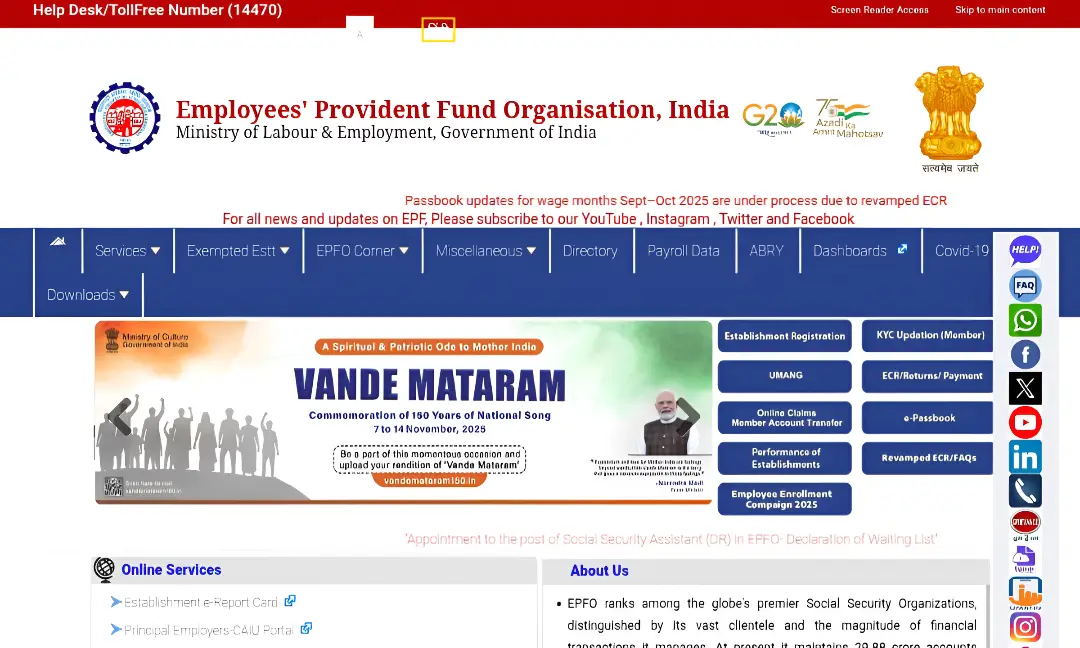
- Open any browser and visit the official EPFO website epfindia.gov.in
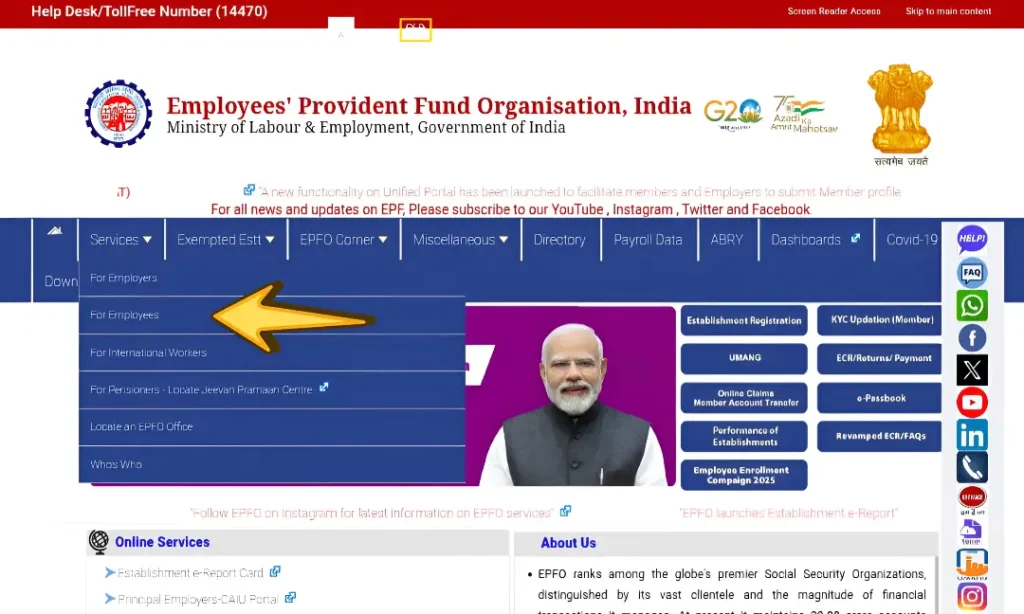
- On the homepage, click on Services
- Select For Employees
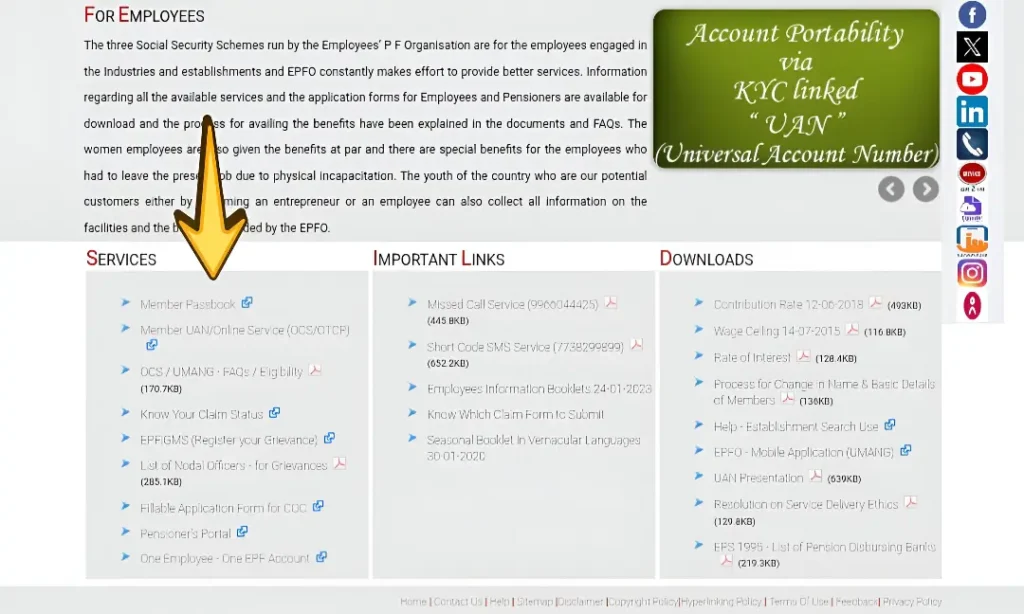
- Click on Member Passbook
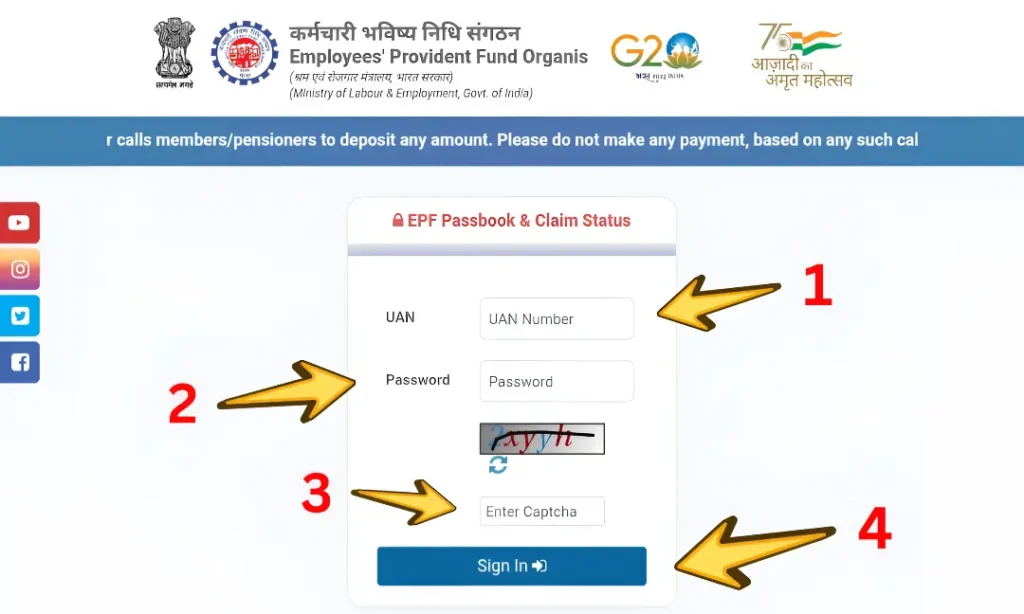
- Enter the following details:
- UAN Number
- EPFO Password
- Captcha Code
- Click on Sign In
- Verify the OTP received on your registered mobile number
After successful verification, you will be redirected to the EPFO Member Dashboard, where you can access all PF-related services.
What You Can Do After Login
- View PF balance
- Download EPFO passbook
- Apply for PF withdrawal
- Track claim status
- Update KYC details
UAN Login – Why It Is Important
UAN (Universal Account Number) is a 12-digit unique number given to every EPFO member.
Importance of UAN
- Same UAN for entire career
- Links all PF accounts
- Required for login, withdrawal, transfer
UAN Activation – Step-by-Step
If your UAN is not activated, follow these steps:
- Visit the EPFO Member Portal
- Click on Activate UAN
- Enter:
- UAN
- Aadhaar Number
- Registered Mobile Number
- Click on Get Authorization PIN
- Enter the OTP received on your mobile
- Set your password and activate UAN
Once activated, you can use the same UAN for lifetime EPFO login.
EPFO Employer Login – Step-by-Step
Employers can log in using the following steps:
- Visit the official EPFO website epfindia.gov.in
- Click on Services
- Select For Employers
- Click on Establishment Login
- Enter:
- Establishment ID
- Password
- Captcha Code
- Click on Login
After login, employers can manage PF contributions, ECR filing, and employee details.
EPFO Passbook – Meaning & Importance
EPFO passbook shows:
- Monthly employee contribution
- Employer contribution
- Interest credited
- Total PF balance
How to View & Download EPFO Passbook
To check and download your EPFO passbook:
- Log in to the EPFO Member Portal using UAN and password
- From the dashboard, click on View Passbook (New)
- Select the Member ID linked to your PF account
- Your EPFO passbook will open on the screen
- Click on Download PDF to save it on your device
The passbook shows contribution details, interest, and total PF balance.
PF Withdrawal Process (2026) – Step-by-Step
Follow these steps to apply for PF withdrawal online:
- Log in to the EPFO Member Portal
- Go to Online Services
- Click on Claim (Form-31, 19, 10C)
- Verify your bank account details
- Click on Proceed for Online Claim
- Select the type of withdrawal:
- Full PF Withdrawal
- Partial PF Advance
- Enter required details and submit the claim
- Verify OTP received on registered mobile number
Once submitted, the claim is processed automatically if KYC is approved.
Documents Required
- UAN
- Aadhaar (linked)
- PAN
- Bank account
- Registered mobile number
Steps to Apply for PF Withdrawal
- Login to EPFO Member Portal
- Go to Online Services → Claim (Form-31, 19, 10C)
- Verify bank details
- Select withdrawal type:
- Full PF Withdrawal
- Partial PF Advance
- Submit claim
Processing Time: 5–10 working days
Track EPFO Claim Status – Step-by-Step
Method 1: Through EPFO Portal
Follow these simple steps to apply for a PF claim online:
- Visit the official EPFO website.
- Click on Online Claim / Member Account Transfer option.
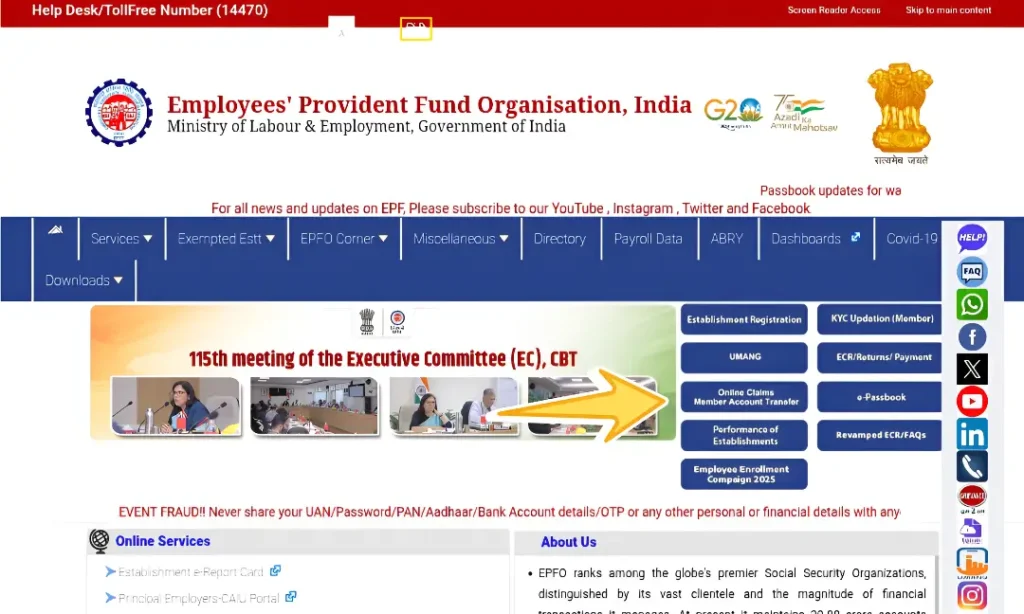
- Log in using your UAN and EPFO password.
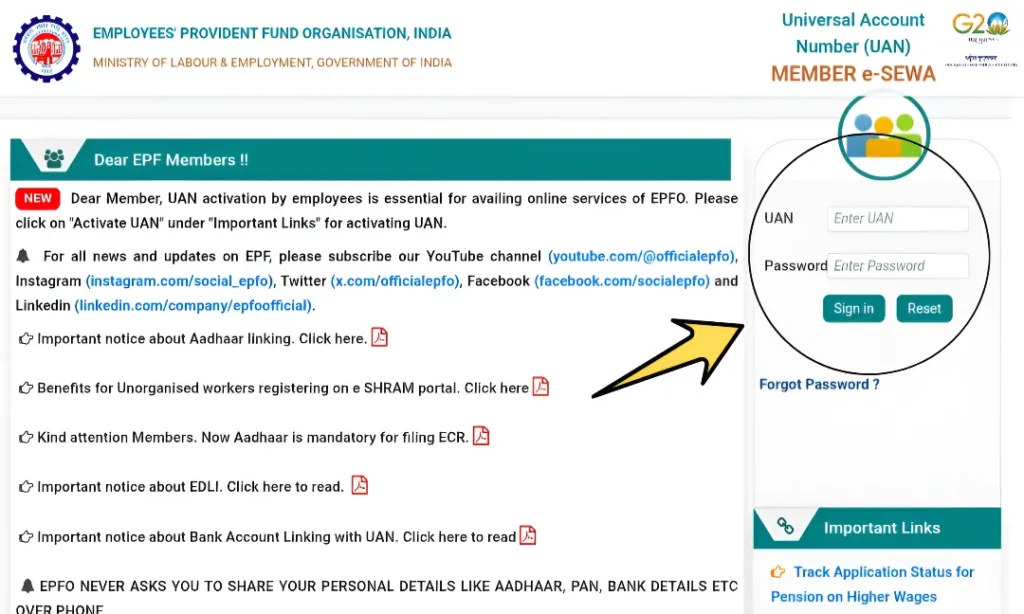
- Enter the OTP received on your registered mobile number to verify login.
- Once verified, your EPFO member dashboard will appear on the screen.
Now you can easily proceed with PF withdrawal or claim-related services.
Method 2: Through UMANG App
- Open the UMANG App
- Search for EPFO
- Select Track Claim
- Enter required details to view status
Reset EPFO Password – Step-by-Step
If you forgot your EPFO password:
- Visit the EPFO login page
- Click on Forgot Password
- Enter your UAN
- Verify OTP sent to your registered mobile number
- Create a new password
- Log in again using the new password
Check PF Balance Without Password (SMS Method)
To check PF balance via SMS:
- Use your registered mobile number
- Send the following SMS
- EPFOHO UAN ENG
- Send it to your “mobile number”
- You will receive PF balance details instantly via SMS
Common EPFO Login Problems & Solutions
| Problem | Solution |
|---|---|
| Invalid credentials | Recheck UAN & password |
| OTP not received | Check mobile network |
| Website slow | Try late night or early morning |
| KYC not approved | Contact employer |
Safety Tips for EPFO Portal
- Use only official websites
- Never share OTP or password
- Logout after use
- Avoid third-party sites
Frequently Asked Questions (FAQs)
How to withdraw money from EPFO online?
To withdraw money from EPFO online:
- Log in to the EPFO member portal using your UAN and password
- Go to Online Services → Claim (Form 31, 19, 10C)
- Verify your bank details
- Select the withdrawal type and submit the claim
The amount is usually credited to your bank account within a few working days.
How to check EPFO balance without login?
You can check your EPFO balance without logging in by:
- Giving a missed call from your registered mobile number
- Sending an SMS in the prescribed EPFO format
- Using the UMANG app
Your mobile number must be linked with your UAN to receive balance details.
How to update bank details in EPFO?
To update your bank details:
- Log in to the EPFO member portal
- Go to Manage → KYC
- Enter your bank account number and IFSC code
- Submit the details
Your employer’s approval is required for the update to be completed.
What are NCP days in the EPFO passbook?
NCP days refer to Non-Contributory Period days.
These are the days when no PF contribution is made due to reasons like unpaid leave, absence, or salary delay. NCP days can reduce the PF contribution for that particular month and are shown separately in the passbook.
How to reset EPFO password if mobile number is changed?
If your registered mobile number has changed:
- First update your mobile number on the EPFO portal through Aadhaar verification
- After the update, click on Forgot Password on the login page
- Verify OTP and set a new password
Once done, you can log in normally.
How long does EPFO claim settlement take?
If all KYC details such as Aadhaar, PAN, and bank account are correct and approved, EPFO claim settlement usually takes 3 to 7 working days. In some cases, it may take slightly longer due to system load.
Can pension amount be withdrawn from EPFO?
Yes, pension amount can be withdrawn if the employee has completed less than 10 years of service.
If the service period is 10 years or more, pension withdrawal is not allowed, and the member becomes eligible for monthly pension after retirement.
What is EPFO Login?
EPFO Login is the official and secure way to access your PF account online. It uses your UAN and password and provides access to all EPFO services from one dashboard.
How can I do EPFO member login?
To do EPFO member login:
- Open the official EPFO member portal
- Enter your UAN, password, and captcha
- Click on Login
After logging in, you can access your PF balance, passbook, and claims.
Is EPFO login the same for all PF services?
Yes, one EPFO login is used for all PF-related services. With a single login, you can view your passbook, apply for withdrawal, track claims, and manage profile details. There is no need for separate logins.
Final Conclusion
The EPFO Login Portal has made PF management easy, fast, and transparent for Indian employees and employers.
By using:
- EPFO Login
- EPFO Member Login
- UAN Login
- EPFO Passbook
- Online PF Withdrawal
- Claim Tracking
employees can take full control of their savings and future planning. Every working individual in India should actively use EPFO online services to stay informed, secure, and financially prepared.